Claude Code 与 CLI 编码工具
2023/7/12
Claude Code 与 CLI 编码工具
wsl 优化
在 Ubuntu WSL(WSL2)里跑 Claude Code(或 Claude CLI)最常见的卡顿/慢/延迟问题,主要来自三个方面:Windows PATH 继承、跨文件系统访问慢、Claude 内部调用 powershell 的 bug。这些基本都能通过配置缓解,大部分用户反馈优化后能接近原生 Linux 的流畅度。
win 端
# 阻止 Windows PATH 注入到 WSL
$config="$HOME\.wslconfig";$content="[wsl2]`n[interop]`nappendWindowsPath = false";Write-Host "=== 配置前 ===" -ForegroundColor Yellow;if(Test-Path $config){Get-Content $config}else{Write-Host "(文件不存在)"};Write-Host "";if(!(Test-Path $config)){$content|Out-File $config -Encoding UTF8;Write-Host "=== 配置后 ===" -ForegroundColor Green;Get-Content $config;Write-Host "`n已创建"}elseif((Get-Content $config -Raw)-notmatch"appendWindowsPath\s*=\s*false"){Add-Content $config "`n$content";Write-Host "=== 配置后 ===" -ForegroundColor Green;Get-Content $config;Write-Host "`n已添加"}else{Write-Host "=== 配置后 ===" -ForegroundColor Green;Get-Content $config;Write-Host "`n无需修改"}
wsl Ubuntu 端
# WSL 端禁用 Windows 路径互操作
config="/etc/wsl.conf";content="[interop]\nappendWindowsPath = false";echo "=== 配置前 ===";if [ -f "$config" ];then cat "$config";else echo "(文件不存在)";fi;echo "";if [ ! -f "$config" ];then echo -e "$content"|sudo tee "$config">/dev/null;echo "=== 配置后 ===";cat "$config";echo -e "\n已创建";elif ! grep -q "appendWindowsPath.*=.*false" "$config";then echo -e "\n$content"|sudo tee -a "$config">/dev/null;echo "=== 配置后 ===";cat "$config";echo -e "\n已添加";else echo "=== 配置后 ===";cat "$config";echo -e "\n无需修改";fi

# 缓存 USERPROFILE 避免 PowerShell 调用 自动检测默认 shell 并配置
shell_rc="$HOME/.$(basename $SHELL)rc";winuser=$(cmd.exe /c "echo %USERNAME%" 2>/dev/null|tr -d '\r');content="export USERPROFILE=\"/mnt/c/Users/$winuser\"";echo "=== 当前 Shell: $SHELL ===";echo "=== 配置文件: $shell_rc ===";echo "";echo "=== 配置前 ===";grep -n "USERPROFILE" "$shell_rc" 2>/dev/null||echo "(未找到)";echo "";if grep -q "export USERPROFILE=" "$shell_rc" 2>/dev/null;then echo "=== 配置后 ===";grep -n "USERPROFILE" "$shell_rc";echo -e "\n已存在";else echo "$content">>"$shell_rc";echo "=== 配置后 ===";grep -n "USERPROFILE" "$shell_rc";echo -e "\n已添加: $content\n请执行: source $shell_rc";fi
claude code
安装卸载
版本大全 https://www.npmjs.com/package/@anthropic-ai/claude-code?activeTab=versions
# 安装
npm install -g @anthropic-ai/claude-code

npm install -g @anthropic-ai/claude-code --registry=https://registry.npmmirror.com
# 卸载
npm uninstall -g @anthropic-ai/claude-code

# 查看目前用得命令安装在哪里
Get-Command claude

# 查看版本
claude -version
# 禁止自动更新
claude config set -g autoUpdates false
# 开启
claude config set autoUpdates true
配置环境变量
# 系统级别
[System.Environment]::SetEnvironmentVariable('ANTHROPIC_AUTH_TOKEN', 'your_anthropic_auth_token', 'Machine')
[System.Environment]::SetEnvironmentVariable('ANTHROPIC_BASE_URL', 'https://crs.itssx.com/api', 'Machine')
[System.Environment]::SetEnvironmentVariable('CLAUDE_CODE_DISABLE_NONESSENTIAL_TRAFFIC', '1', 'Machine')

# 删除
# 删除系统级(Machine 级)环境变量
[System.Environment]::SetEnvironmentVariable('ANTHROPIC_AUTH_TOKEN', $null, 'Machine')
[System.Environment]::SetEnvironmentVariable('ANTHROPIC_BASE_URL', $null, 'Machine')
[System.Environment]::SetEnvironmentVariable('CLAUDE_CODE_DISABLE_NONESSENTIAL_TRAFFIC', $null, 'Machine')
# ✅ 删除用户级(User)环境变量
[System.Environment]::SetEnvironmentVariable('ANTHROPIC_AUTH_TOKEN', $null, 'User')
[System.Environment]::SetEnvironmentVariable('ANTHROPIC_BASE_URL', $null, 'User')
[System.Environment]::SetEnvironmentVariable('CLAUDE_CODE_DISABLE_NONESSENTIAL_TRAFFIC', $null, 'User')
# 🧭 验证是否真的删掉
Get-ChildItem Env:ANTHROPIC_*

# linux & mac 查看当前环境变量
echo $SHELL

echo "BASE: $ANTHROPIC_BASE_URL" && echo "TOKEN: $ANTHROPIC_AUTH_TOKEN"

# 对于 bash (默认)
echo 'export ANTHROPIC_BASE_URL="https://crs.itssx.com/api"' >> ~/.bashrc
echo 'export ANTHROPIC_AUTH_TOKEN="你的API密钥"' >> ~/.bashrc
source ~/.bashrc

# 对于 zsh
echo 'export ANTHROPIC_BASE_URL="https://crs.itssx.com/api"' >> ~/.zshrc
echo 'export ANTHROPIC_AUTH_TOKEN="你的API密钥"' >> ~/.zshrc
source ~/.zshrc
问题记录
API Error: 413 Something went wrong
可能是读取了大文件?pdf ?cc 不太支持目前最佳为文字和图片
API Error: 424 {"error":"Claude system prompt similarity too low. Modifying the system
prompt is prohibited"}
转发服务问题 联系我
Error: File has been unexpectedly modified. Read it again before attempting to write it.
工具本来的问题 新开窗口 或者关闭编辑器 完全重新打开项目
settings.json 配置模板
注意不能有注释的 下面有注释要删除的
这是初期在我的 windows配置的 因为 cc 干活老是一直问问问
{
  "env": {
    "DISABLE_AUTOUPDATER": "1"
  },
  "permissions": {
    "allow": [
      "Read(**)",
      "Read(//c/Users/ssx/.claude/**)",
      "Read(//c/Users/ssx/**)",
      "Grep(**)",
      "Glob(**)",
      "LS(**)",
      "WebFetch",
      "WebFetch(domain:github.com)",
      "WebSearch",
      "TodoWrite",
      "TodoRead",
      "NotebookRead(**)",
      "Task(*)",
      "Agent(*)",
      "mcp__*",
      "Bash(git:*)",
      "Bash(npm:*)",
      "Bash(pnpm:*)",
      "Bash(yarn:*)",
      "Bash(bun:*)",
      "Bash(node:*)",
      "Bash(npx:*)",
      "Bash(python:*)",
      "Bash(pip:*)",
      "Bash(go:*)",
      "Bash(cargo:*)",
      "Bash(dotnet:*)",
      "Bash(java:*)",
      "Bash(javac:*)",
      "Bash(javap:*)",
      "Bash(make:*)",
      "Bash(cmake:*)",
      "Bash(gradle:*)",
      "Bash(mvn:*)",
      "Bash(tsc:*)",
      "Bash(vite:*)",
      "Bash(webpack:*)",
      "Bash(docker:*)",
      "Bash(docker-compose:*)",
      "Bash(kubectl:*)",
      "Bash(helm:*)",
      "Bash(eslint:*)",
      "Bash(prettier:*)",
      "Bash(biome:*)",
      "Bash(jest:*)",
      "Bash(vitest:*)",
      "Bash(pytest:*)",
      "Bash(cat:*)",
      "Bash(head:*)",
      "Bash(tail:*)",
      "Bash(ls:*)",
      "Bash(dir:*)",
      "Bash(wc:*)",
      "Bash(which:*)",
      "Bash(where:*)",
      "Bash(pwd:*)",
      "Bash(cd:*)",
      "Bash(mkdir:*)",
      "Bash(cp:*)",
      "Bash(mv:*)",
      "Bash(rm:*)",
      "Bash(touch:*)",
      "Bash(ln:*)",
      "Bash(chmod:*)",
      "Bash(find:*)",
      "Bash(grep:*)",
      "Bash(awk:*)",
      "Bash(sed:*)",
      "Bash(sort:*)",
      "Bash(uniq:*)",
      "Bash(cut:*)",
      "Bash(tr:*)",
      "Bash(jq:*)",
      "Bash(yq:*)",
      "Bash(diff:*)",
      "Bash(tar:*)",
      "Bash(gzip:*)",
      "Bash(zip:*)",
      "Bash(unzip:*)",
      "Bash(7z:*)",
      "Bash(curl:*)",
      "Bash(wget:*)",
      "Bash(ping:*)",
      "Bash(netstat:*)",
      "Bash(ss:*)",
      "Bash(nslookup:*)",
      "Bash(ps:*)",
      "Bash(df:*)",
      "Bash(du:*)",
      "Bash(free:*)",
      "Bash(tree:*)",
      "Bash(echo:*)",
      "Bash(date:*)",
      "Bash(uname:*)",
      "Bash(env:*)",
      "Bash(export:*)",
      "Bash(source:*)",
      "Bash(xargs:*)"
    ],
    "deny": [
      "Bash(set:*)",
      "Bash(echo %:*)",
      "Bash(powershell:*)",
      "Read(**\\.ssh\\**)",
      "Read(**\\id_rsa*)",
      "Read(**\\id_ed25519*)",
      "Read(**\\.pem)",
      "Read(**\\.key)",
      "Read(**\\AppData\\Roaming\\Microsoft\\Credentials\\**)",
      "Read(**\\AppData\\Local\\Microsoft\\Credentials\\**)",
      "Read(**\\AppData\\Roaming\\Microsoft\\Protect\\**)",
      "Read(**\\AppData\\Local\\Microsoft\\Vault\\**)",
      "Read(**\\AppData\\Local\\Google\\Chrome\\User Data\\**)",
      "Read(**\\AppData\\Roaming\\Mozilla\\Firefox\\Profiles\\**)",
      "Read(**\\AppData\\Local\\Microsoft\\Edge\\User Data\\**)",
      "Read(**\\AppData\\Local\\BraveSoftware\\**)",
      "Read(**\\.aws\\**)",
      "Read(**\\.azure\\**)",
      "Read(**\\.docker\\config.json)",
      "Read(**\\.npmrc)",
      "Read(**\\.gitconfig)",
      "Read(**\\.git-credentials)",
      "Read(**\\AppData\\Roaming\\Code\\User\\globalStorage\\**)",
      "Read(**\\.vscode\\settings.json)",
      "Read(**\\.reg)",
      "Read(**\\.pfx)",
      "Read(**\\.p12)",
      "Read(**\\.cer)",
      "Read(**\\.crt)",
      "Read(**\\secrets.*)",
      "Read(**\\credentials.*)",
      "Read(**\\password.*)",
      "Read(**\\token.*)",
      "Read(**\\api_key.*)",
      "Read(**\\private.*)"
    ],
    "ask": [],
    "additionalDirectories": ["C:\\", "D:\\", "~"]
  },
  "statusLine": {
    "type": "command",
    "command": "npx -y ccstatusline@latest",
    "padding": 0
  }
}
wsl 版本
{
  "env": {
    "DISABLE_AUTOUPDATER": "1"
  },
  "permissions": {
    "allow": [
      "Read(**)",
      "Read(/home/*/.claude/**)",
      "Read(/home/**)",
      "Read(/mnt/c/Users/ssx/.claude/**)",
      "Read(/mnt/c/Users/ssx/**)",
      "Grep(**)",
      "Glob(**)",
      "LS(**)",
      "WebFetch",
      "WebFetch(domain:github.com)",
      "WebSearch",
      "TodoWrite",
      "TodoRead",
      "NotebookRead(**)",
      "Task(*)",
      "Agent(*)",
      "mcp__*",
      "Bash(git:*)",
      "Bash(npm:*)",
      "Bash(pnpm:*)",
      "Bash(yarn:*)",
      "Bash(bun:*)",
      "Bash(node:*)",
      "Bash(npx:*)",
      "Bash(python:*)",
      "Bash(python3:*)",
      "Bash(pip:*)",
      "Bash(pip3:*)",
      "Bash(go:*)",
      "Bash(cargo:*)",
      "Bash(rustc:*)",
      "Bash(dotnet:*)",
      "Bash(java:*)",
      "Bash(javac:*)",
      "Bash(javap:*)",
      "Bash(make:*)",
      "Bash(cmake:*)",
      "Bash(gradle:*)",
      "Bash(mvn:*)",
      "Bash(tsc:*)",
      "Bash(vite:*)",
      "Bash(webpack:*)",
      "Bash(docker:*)",
      "Bash(docker-compose:*)",
      "Bash(kubectl:*)",
      "Bash(helm:*)",
      "Bash(podman:*)",
      "Bash(eslint:*)",
      "Bash(prettier:*)",
      "Bash(biome:*)",
      "Bash(black:*)",
      "Bash(ruff:*)",
      "Bash(jest:*)",
      "Bash(vitest:*)",
      "Bash(pytest:*)",
      "Bash(mocha:*)",
      "Bash(cat:*)",
      "Bash(head:*)",
      "Bash(tail:*)",
      "Bash(less:*)",
      "Bash(more:*)",
      "Bash(ls:*)",
      "Bash(ll:*)",
      "Bash(dir:*)",
      "Bash(wc:*)",
      "Bash(which:*)",
      "Bash(whereis:*)",
      "Bash(type:*)",
      "Bash(pwd:*)",
      "Bash(cd:*)",
      "Bash(mkdir:*)",
      "Bash(cp:*)",
      "Bash(mv:*)",
      "Bash(rm:*)",
      "Bash(touch:*)",
      "Bash(ln:*)",
      "Bash(chmod:*)",
      "Bash(chown:*)",
      "Bash(find:*)",
      "Bash(grep:*)",
      "Bash(awk:*)",
      "Bash(sed:*)",
      "Bash(sort:*)",
      "Bash(uniq:*)",
      "Bash(cut:*)",
      "Bash(tr:*)",
      "Bash(jq:*)",
      "Bash(yq:*)",
      "Bash(diff:*)",
      "Bash(tar:*)",
      "Bash(gzip:*)",
      "Bash(gunzip:*)",
      "Bash(zip:*)",
      "Bash(unzip:*)",
      "Bash(curl:*)",
      "Bash(wget:*)",
      "Bash(ping:*)",
      "Bash(netstat:*)",
      "Bash(ss:*)",
      "Bash(nc:*)",
      "Bash(nslookup:*)",
      "Bash(dig:*)",
      "Bash(ps:*)",
      "Bash(top:*)",
      "Bash(htop:*)",
      "Bash(df:*)",
      "Bash(du:*)",
      "Bash(free:*)",
      "Bash(uptime:*)",
      "Bash(tree:*)",
      "Bash(echo:*)",
      "Bash(printf:*)",
      "Bash(date:*)",
      "Bash(uname:*)",
      "Bash(env:*)",
      "Bash(export:*)",
      "Bash(source:*)",
      "Bash(xargs:*)",
      "Bash(tee:*)",
      "Bash(nvm:*)",
      "Bash(fnm:*)",
      "Bash(pyenv:*)"
    ],
    "deny": [
      "Bash(set:*)",
      "Bash(echo %:*)",
      "Bash(powershell:*)",
      "Read(**/.ssh/**)",
      "Read(**/id_rsa*)",
      "Read(**/id_ed25519*)",
      "Read(**/.pem)",
      "Read(**/.key)",
      "Read(/home/**/.aws/**)",
      "Read(/home/**/.azure/**)",
      "Read(/home/**/.docker/config.json)",
      "Read(/home/**/.npmrc)",
      "Read(/home/**/.gitconfig)",
      "Read(/home/**/.git-credentials)",
      "Read(/home/**/.vscode/settings.json)",
      "Read(/home/**/.config/**/credentials/**)",
      "Read(/home/**/.local/share/**/credentials/**)",
      "Read(/mnt/c/Users/**/AppData/Roaming/Microsoft/Credentials/**)",
      "Read(/mnt/c/Users/**/AppData/Local/Microsoft/Credentials/**)",
      "Read(/mnt/c/Users/**/AppData/Roaming/Microsoft/Protect/**)",
      "Read(/mnt/c/Users/**/AppData/Local/Microsoft/Vault/**)",
      "Read(/mnt/c/Users/**/AppData/Local/Google/Chrome/User Data/**)",
      "Read(/mnt/c/Users/**/AppData/Roaming/Mozilla/Firefox/Profiles/**)",
      "Read(/mnt/c/Users/**/AppData/Local/Microsoft/Edge/User Data/**)",
      "Read(/mnt/c/Users/**/AppData/Local/BraveSoftware/**)",
      "Read(/mnt/c/Users/**/AppData/Roaming/Code/User/globalStorage/**)",
      "Read(**/.reg)",
      "Read(**/.pfx)",
      "Read(**/.p12)",
      "Read(**/.cer)",
      "Read(**/.crt)",
      "Read(**/secrets.*)",
      "Read(**/credentials.*)",
      "Read(**/password.*)",
      "Read(**/token.*)",
      "Read(**/api_key.*)",
      "Read(**/private.*)"
    ],
    "ask": [],
    "additionalDirectories": ["/", "/home", "/mnt/c", "/mnt/d", "~"]
  },
  "statusLine": {
    "type": "command",
    "command": "npx -y ccstatusline@latest",
    "padding": 0
  }
}
.claude.json 配置模板
{
  "numStartups": 13,
  "installMethod": "unknown",
  "tipsHistory": {
    "new-user-warmup": 3,
    "memory-command": 3,
    "theme-command": 3,
    "status-line": 3,
    "prompt-queue": 3,
    "enter-to-steer-in-relatime": 3,
    "todo-list": 3,
    "ide-upsell-external-terminal": 3,
    "# for memory": 4,
    "install-github-app": 4,
    "drag-and-drop-images": 4,
    "double-esc": 7,
    "continue": 7,
    "shift-tab": 7,
    "image-paste": 10
  },
  "cachedStatsigGates": {
    "tengu_disable_bypass_permissions_mode": false
  },
  "userID": "<你的userID>",
  "firstStartTime": "<你的首次启动时间>",
  "projects": {},
  "hasCompletedOnboarding": true,
  "lastOnboardingVersion": "1.0.106",
  "hasOpusPlanDefault": false,
  "subscriptionNoticeCount": 0,
  "hasAvailableSubscription": false,
  "isQualifiedForDataSharing": false,
  "mcpServers": {
    "playwright": {
      "command": "npx",
      "args": ["@playwright/mcp@latest"]
    }
  },
  "cachedChangelog": "",
  "changelogLastFetched": 0,
  "lastReleaseNotesSeen": "1.0.106"
}
agent
https://github.com/wshobson/agents
插件
ccstatusline
很好用啊 可以显示当前会话用了多少
https://github.com/sirmalloc/ccstatusline
# Run the configuration TUI with npm
npx ccstatusline@latest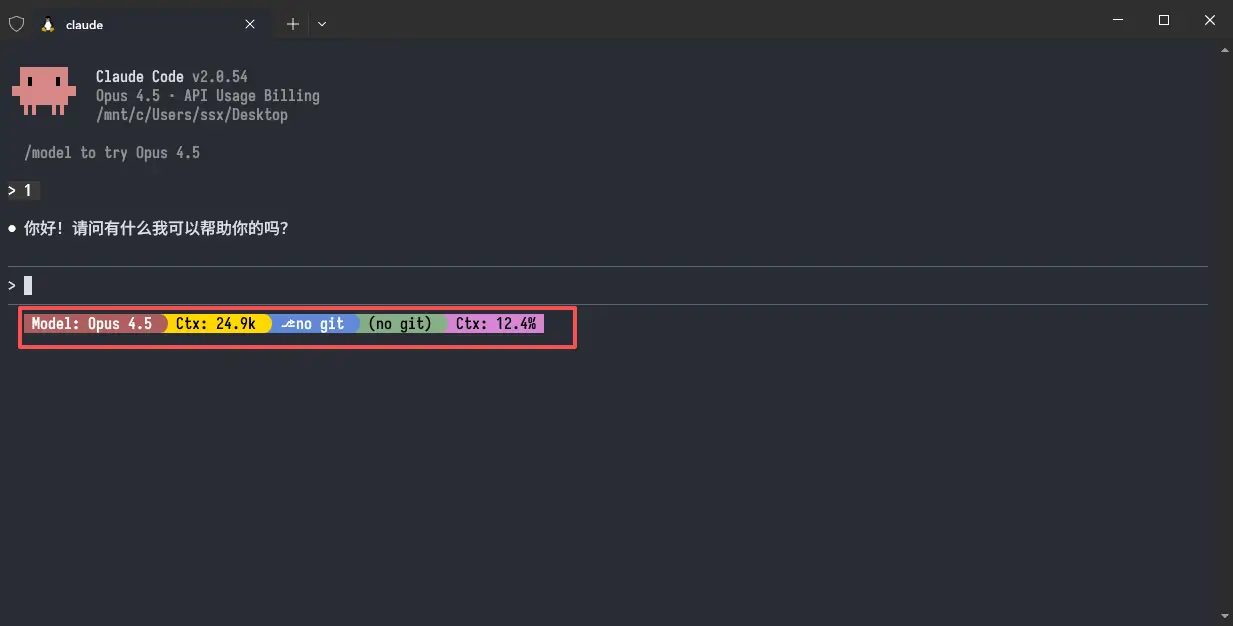
codex
# 安装
npm install -g @openai/codex
npm install -g @openai/codex@alpha

npm install -g @openai/codex --registry=https://registry.npmmirror.com

codex -m gpt-5.1-codex-max --sandbox danger-full-access
codex --yolo -m gpt-5.1-codex -c model_reasoning_effort="high"

# 系统级别
[System.Environment]::SetEnvironmentVariable('CRS_OAI_KEY', 'your_crs_oai_key', 'Machine')

# 删除
# 删除系统级(Machine 级)环境变量
[System.Environment]::SetEnvironmentVariable('CRS_OAI_KEY', $null, 'Machine')
# ✅ 删除用户级(User)环境变量
[System.Environment]::SetEnvironmentVariable('CRS_OAI_KEY', $null, 'User')

# 🧭 验证是否真的删掉
Get-ChildItem Env:CRS_OAI_KEY


# linux & mac 查看当前环境变量
echo "CRS_OAI_KEY: $CRS_OAI_KEY"

# 对于 zsh
echo "export CRS_OAI_KEY=cr_xxxxxxxxxx" >> ~/.zshrc
source ~/.zshrc
glm
对话
# 系统级别
# 系统级(Machine 级)设置方式
# ⚠️ 需要以管理员身份运行 PowerShell
[System.Environment]::SetEnvironmentVariable('ANTHROPIC_AUTH_TOKEN', 'your_zhipu_api_key', 'Machine')
[System.Environment]::SetEnvironmentVariable('ANTHROPIC_BASE_URL', 'https://open.bigmodel.cn/api/anthropic', 'Machine')
[System.Environment]::SetEnvironmentVariable('CLAUDE_CODE_DISABLE_NONESSENTIAL_TRAFFIC', '1', 'Machine')
factory
注册 需要手机号码验证
https://app.factory.ai/welcome
查询key用量
# Windows 安装
irm https://app.factory.ai/cli/windows | iex
# macos/linux
curl -fsSL https://app.factory.ai/cli | sh

# 添加环境变量 Windows powershell 执行
[Environment]::SetEnvironmentVariable(
    'Path',
    [Environment]::GetEnvironmentVariable('Path','User') + ';C:\Users\ssx\bin',
    'User'
)